Jira and Confluence DC to Atlassian Cloud migration runbook
This guide documents the migration rollout for aiopstraining.com while staying aligned to Atlassian’s official Cloud migration standards, governance model, and operational readiness requirements.
Primary goals
- Reduce on-premise data sprawl and migration risk before Cloud cutover.
- Align user identity, DNS, RBAC, and tenant controls to the Atlassian org model.
- Preserve business-critical Jira and Confluence workflows with staged migration runs.
Domain context
- Domain reference:
aiopstraining.com - Identity source: SAML + SCIM directory integration
- Cloud design: primary and secondary production sites
Phase 1
Pre-migration checklist & discovery
Before project execution, complete the standard discovery steps for Jira and Confluence Cloud migration, with a focus on app compatibility, data quality, and tenant readiness for aiopstraining.com.
- Review Atlassian system app dependencies, custom integrations, and unsupported customizations.
- Verify database collation compatibility, integrity checks, and schema assumptions.
- Review duplicate users, stale groups, malformed content, and inactive accounts.
- Assess custom fields, workflows, macros, and dashboard objects against Cloud support boundaries.
- Confirm site architecture, admin ownership, domain control, and migration execution sequencing.
Official Atlassian references
Portfolio insights, cloud readiness, and health checks
After site setup and cleanup are complete, run the Atlassian portfolio insights and readiness review before executing the production migration:
- Review cloud readiness scores, instance health, and detected instance status.
- Verify data quality warnings, app compatibility warnings, and migration blockers.
- Confirm that the target cloud org, site(s), and sandbox placements are correctly aligned.
- Document any detected issues in a migration risk register before moving to the next run.
Jira Cloud Migration Assistant pre-migration checklist (24 steps)
| Step | Checklist item | Area |
|---|---|---|
| 1 | Confirm Jira DC version is supported for migration. | Platform readiness |
| 2 | Review current Jira apps and identify unsupported or legacy add-ons. | Apps |
| 3 | Check database collation and compatibility before import. | Database |
| 4 | Validate system requirements and server diagnostics. | Infrastructure |
| 5 | Confirm there are no duplicate user emails in the authentication layer. | Users |
| 6 | Review inactive, orphaned, or invalid users before migration. | Users |
| 7 | Examine Jira groups, roles, and permission schemes. | Access |
| 8 | Document project-level permissions and schema dependencies. | Access |
| 9 | Identify custom fields that will require Cloud mapping. | Configuration |
| 10 | Map workflows and valid transitions against Cloud functionality. | Workflows |
| 11 | Review issue schemes, screens, and field configuration needs. | Configuration |
| 12 | Assess project attachments and file size impacts. | Storage |
| 13 | Review automation rules that may not behave the same in Cloud. | Automation |
| 14 | Catalog webhook endpoints and external integrations. | Integrations |
| 15 | Identify data to archive or prune before migration. | Data cleanup |
| 16 | Review Jira-to-Confluence links and cross-application dependencies. | Integrations |
| 17 | Prepare a migration test plan using a sandbox or pilot project. | Testing |
| 18 | Confirm domain ownership and user claim configuration. | Identity |
| 19 | Finalize SAML or IdP readiness before user provisioning. | Identity |
| 20 | Ensure org administrators and site admins are assigned. | Governance |
| 21 | Verify API token policies and functional account controls. | Security |
| 22 | Prepare a rollback, communication, and support plan. | Operations |
| 23 | Validate migration sequencing with attachments and app data split. | Execution |
| 24 | Execute the final readiness check before the production migration run. | Go-live |
Phase 2
Source repository cleanup & database pre-checks
Jira pruning
Remove stale projects, archived workstreams, and legacy issue data before migration to reduce complexity.
- Identify abandoned projects and move them into Data Center archival workflows.
- Review duplicate project keys, reused schemes, and stale automation rules.
- Retain only production-critical data in the candidate migration set.
Confluence pruning
Clean space inventory and remove unsupported content before the final migration run.
- Archive outdated spaces and obsolete pages no longer required by operations.
- Review custom HTML macros, corrupted layouts, and legacy page templates.
- Remove duplicate content and explain unsupported implementations to stakeholders.
Database pre-check 1: Jira duplicate emails
SELECT lower_email_address, COUNT(id)
FROM cwd_user
GROUP BY lower_email_address
HAVING COUNT(id) > 1;
Atlassian support reference: Find duplicate users by email and username
Database pre-check 2: Broken group structures
SELECT g.id,
       g.group_name,
       g.parent_id,
       p.group_name AS parent_group_name
FROM cwd_group g
LEFT JOIN cwd_group p ON g.parent_id = p.id
WHERE g.parent_id IS NOT NULL
  AND p.id IS NULL
ORDER BY g.group_name;
Use this query to isolate empty, orphaned, or dangling hierarchy records before provisioning group access in Cloud.
Database pre-check 3: Unsupported Confluence macros
SELECT s.spacekey,
       c.title,
       bc.contentid,
       bc.body
FROM bodycontent bc
JOIN content c ON bc.contentid = c.id
JOIN spaces s ON c.spaceid = s.id
WHERE bc.body ILIKE '%<ac:structured-macro%'
   OR bc.body ILIKE '%customhtml%'
   OR bc.body ILIKE '%html-macro%'
ORDER BY s.spacekey, c.title;
Atlassian support reference: Find pages and spaces using a specific macro
Phase 3
App & plugin assessment
Forge apps
- Cloud-native architecture
- Improved security and tenant isolation
- Aligned with Atlassian Cloud runtime and data policies
- Better fit for long-term cloud supportability
Connect / non-Forge apps
- Greater legacy dependency risk
- May require reconfiguration or replacement
- Requires data residency and API review
- Needs compatibility testing before migration
| App / platform | Migration risk | Recommendation |
|---|---|---|
| EazyBI & Tempo | Medium | Validate reporting semantics and data translation before Cloud cutover. |
| ScriptRunner & JMWE | High | Translate Groovy scripts to Cloud-native equivalents or re-engineer post-functions. |
| Structure & Xray | Medium | Review hierarchical views and test repositories with data mapping to Cloud. |
| Rich Filters & custom fields | Medium | Preserve dashboard metadata and ensure field schema compatibility. |
| Draw.io & PlantUML | Low | Retest inline rendering inside Confluence after migration and validate macros. |
| Bulk Clone & webhooks | High | Preserve automation logic, endpoint trust, and clone workflow behaviors. |
Phase 4
Enterprise organization setup & identity
- User management: Standardize global accounts, invitation flows, and identity verification.
- Group architecture: Use a clear nested/flat access strategy mapped to business ownership.
- DNS configuration: Verify ownership of
aiopstraining.comusing TXT and CNAME records in Atlassian Admin. - User claiming: Set up automatic onboarding for users with @aiopstraining.com addresses.
- Authentication policy: Enforce SAML with Okta or Azure AD as the identity provider.
- API token lifecycle: Enable or disable user-generated API tokens by policy and governance rules.
- Service and functional accounts: Keep a separated policy for SSO-enforced user accounts and API-based service accounts.
- Data security policy: Disable anonymous public access and block downloads on unmanaged devices.
- Atlassian Rovo: Limit AI-first access to sandbox environments for evaluation and staging.
- Sandbox provisioning: Create isolated staging instances matching production metadata.
- Cloud site creation: Initialize primary and secondary production instances under the org umbrella.
- URL customization: Provision vanity paths and custom mappings for user-facing cloud URLs.
- Org API token controls: Restrict systemic API access to approved app and automation trust boundaries.
- Administrative RBAC: Define strict boundaries between org administrators and site administrators.
- Site onboarding & consolidation: Link newly created and legacy sites into a single corporate org model.
- Enterprise AD sync: Configure SCIM directory sync to provision users and group membership from Active Directory.
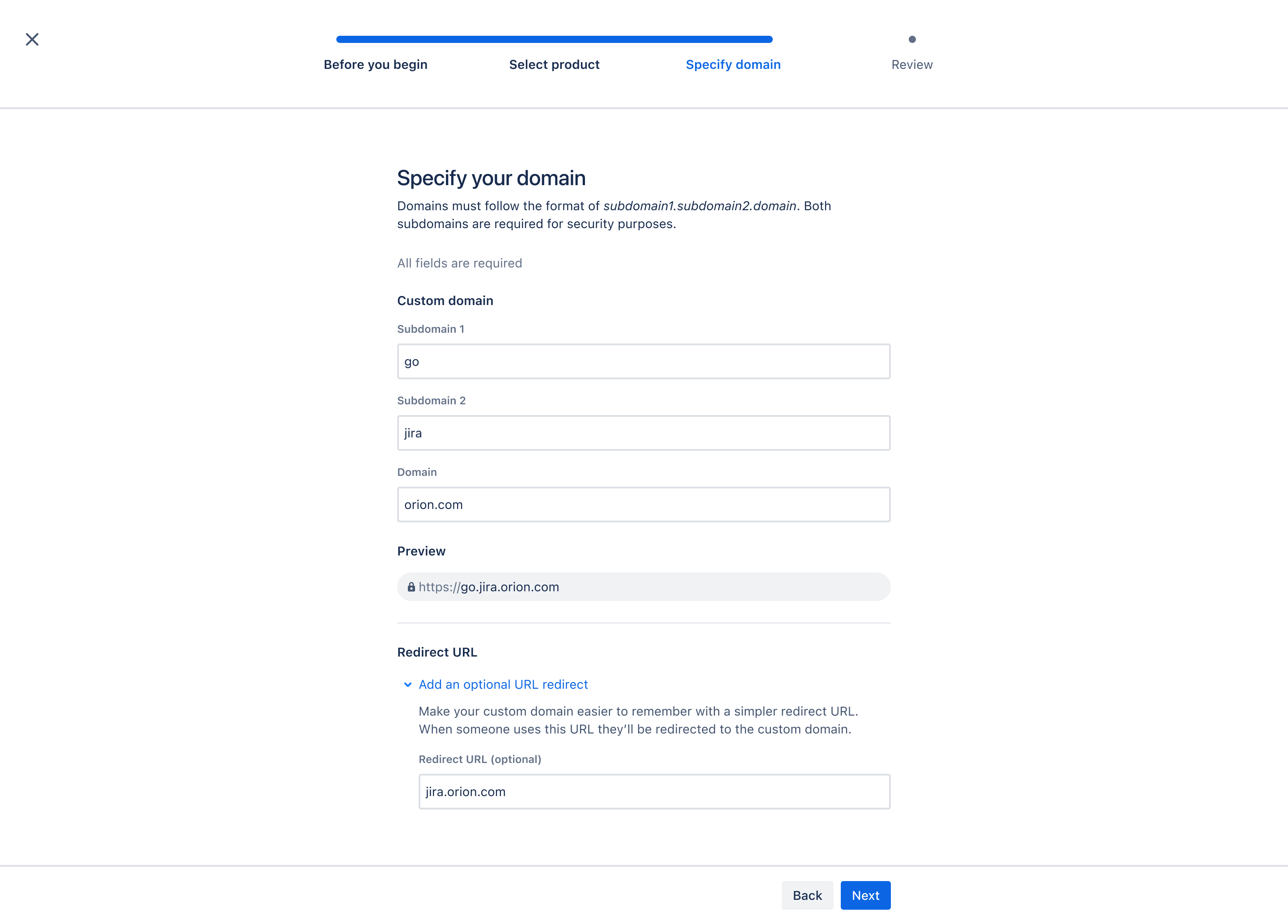
Custom domain request flow in Atlassian Administration for app URL and DNS validation
Organization overview for the Atlassian cloud tenant and migration readiness
| User | Type | Status |
|---|---|---|
| jsmith | Managed | Active |
| teamadmin | Admin | Verified |
| svc-bot | Service | Managed |
Directory control for users, managed accounts, service accounts, and admins
Domain verification, DNS ownership, and user claim configuration for aiopstraining.com
Okta / Azure AD
Required for all users
Valid, expiry monitored
Authentication policy and SAML enforcement model for enterprise user access
| User | Group | Status |
|---|---|---|
| jsmith | jira-admins | Synced |
| akim | confluence-editors | Synced |
| svc-bot | automation | Managed |
SCIM directory sync and provisioned memberships for Active Directory-driven user onboarding
Approved Atlassian apps
Staging environment
Restricted to org policy
Atlassian apps, marketplace access, sandbox controls, and site-level lifecycle management
Organizational settings to review at the Atlassian org level
Phase 5
Security & perimeter network whitelisting
Harden network access before and during migration by restricting traffic to the required Atlassian Cloud domains and validating egress control paths.
- Whitelist Atlassian Cloud egress destinations used by Jira, Confluence, and migration tooling.
- Review proxy, firewall, and WAF policies for Cloud API routes and custom domain access.
- Confirm secure access for admin and operational teams.
Migration failure troubleshooting
When migration tasks fail, check the following sources in sequence:
1. Splunk / SIEM
Search for migration-related errors, failed API calls, or unusual authentication anomalies.
2. Atlassian migration plan logs
Review Jira/Confluence migration plan logs for object failures, validation issues, retry metadata, and staging results.
3. Local server logs
Inspect Data Center application logs for database timeouts, app configuration conflicts, or malformed content.
Phase 6
Execution & migration strategies
Integration setup
Preserve native Jira-to-Confluence app links before and after migration so that page connectivity and project references remain intact.
Phased migration strategy
- Establish the initial migration plan in Data Center and validate dataset scope.
- Split large migrations into manageable workstreams for optimization and error containment.
- Stage app, user, and project migrations in sequence instead of all at once.
Execution runbook
Attachments-only migration
Migrate attachments ahead of the main project data to reduce maintenance window impact.
Configuration & core migration
Execute user mappings, schemas, and primary project/space data transfers in a controlled window.
App-specific migration handling
Split app migrations from project migrations to isolate failure domains. If a plugin sync fails, perform a targeted re-run of the migration for the affected app or project set and validate data parity before continuing.
References